← All software
Duophone icon: an amber lamp and a red lamp in a brass bezel on walnut
Offline audio recorderfor Windows

Duophone

Record and transcribe everything. Offline. Pay once.

11.99 USD one-timeLaunch week: 50% off, 5.99 USD until 8 Dec
On Microsoft Store 3 DecFree trial: 1 hour of recording · Windows 10/11
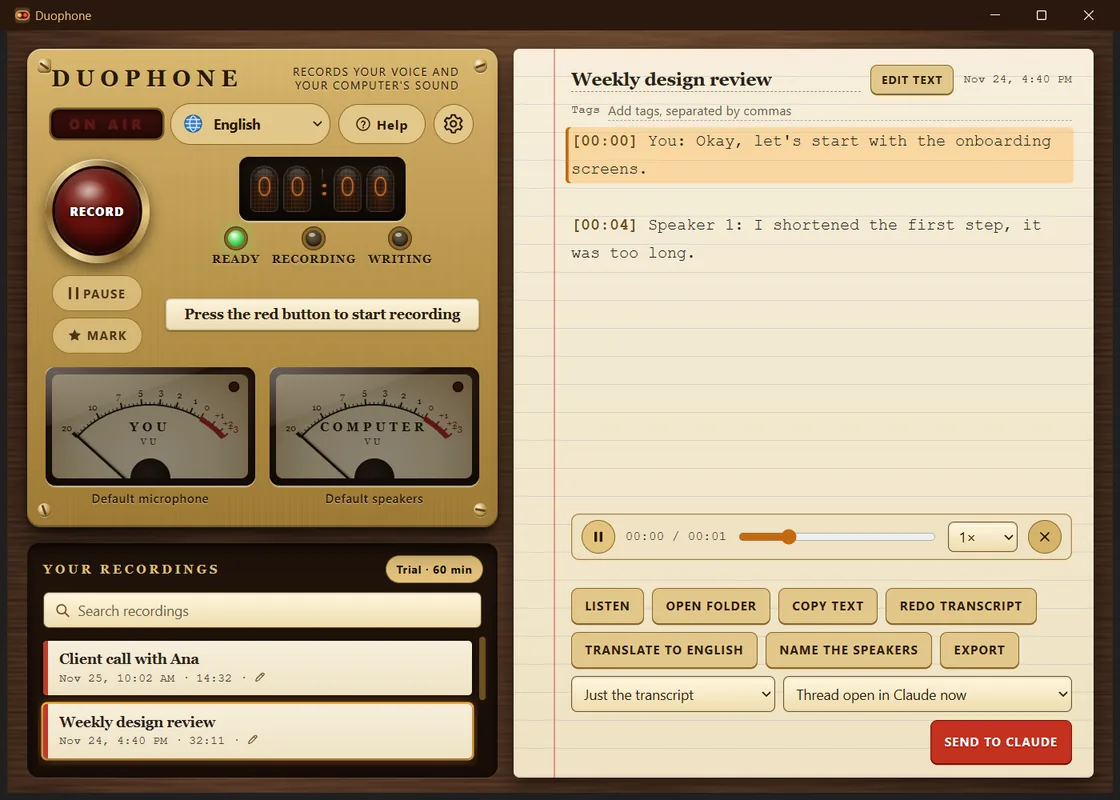
Duophone's main window: a compact recorder with two VU meters, a list of recordings, and a full-height transcript that labels You and Speaker 1, with a built-in player and an Export button.
  1. Fully offlineRecording, transcription, speakers and translation run on your own PC. Nothing leaves it unless you press Send to Claude.
  2. No subscriptionPay once. No monthly fee, no minutes cap, no Duophone account.
  3. Always worksNo servers of ours to go down, nothing to sign in to, and updates never touch your recordings.
  4. Constant supportA real person answers, and free updates keep coming.
Route S · Stop 1S1

Stop 1 · Record PC audio and microphone

Both sides of the call.

Duophone records your microphone and whatever your PC plays, at the same time. Keep them in one MP3 or on separate tracks.

  • Global shortcuts, markers and notes while you record
  • A buffer that keeps the last minute, so you never miss the start
  • A floating mini recorder that stays on top of your work
Duophone's floating mini recorder showing a recording in progress
The floating mini recorder
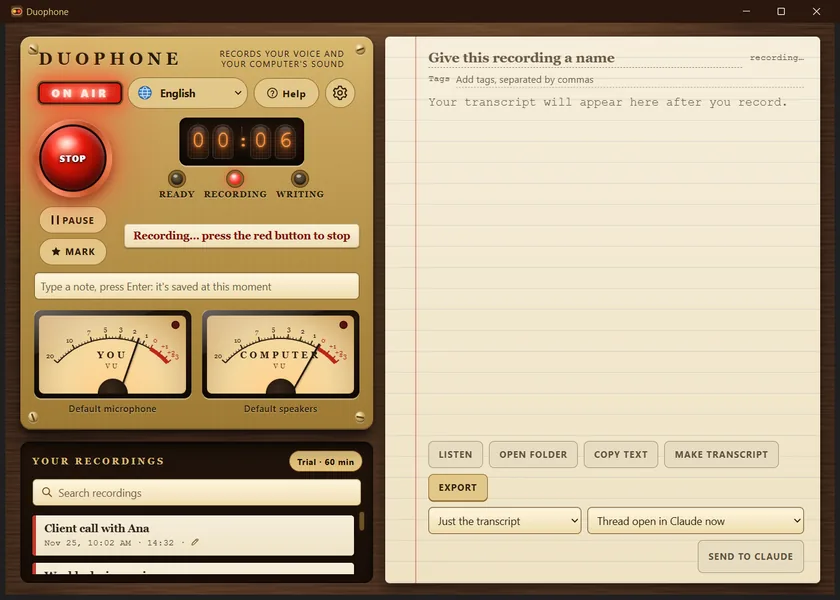
Duophone while recording: the On Air lamp lit, a red Stop button and both VU needles moving
Stop 2 · Offline transcription

Who said what. On your PC.

01You and everyone else

Marks your voice as You and tells the other speakers apart.

02Click a line, hear it

Click any transcript line to hear that moment again.

03Captions and clean-up

Optional live captions while you record, and filler-word clean-up.

Stop 3 · Translate

Five languages. Zero cloud.

Offline translation between English, Spanish, Portuguese, French and German, done on your own PC. The app itself speaks all five too.

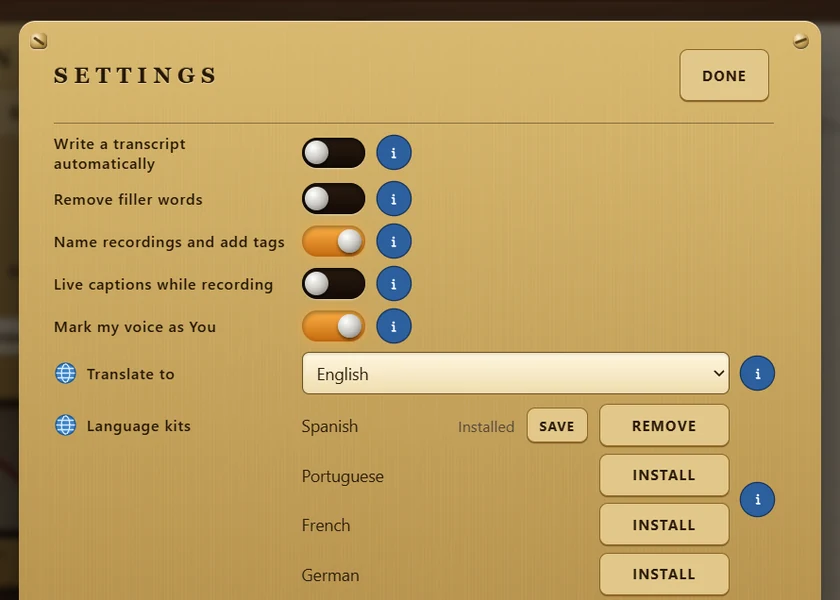
Duophone's settings with language kits for offline translation
Language kits for offline translation
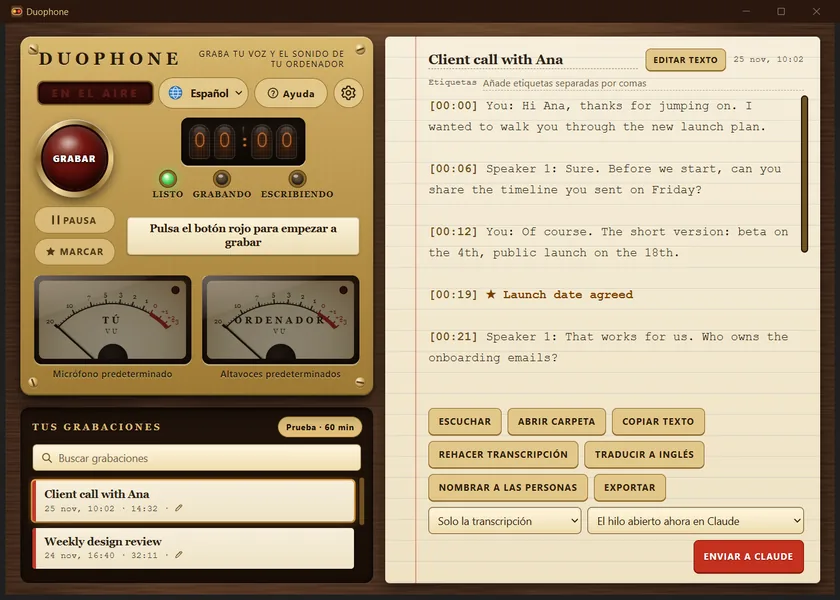
Duophone with its interface in Spanish
Duophone in Spanish
Straight answers

Offline transcription software, no subscription.

Does it work offline?

Yes. Recording, transcription, speaker labels and translation run on your own PC, and it works with the network unplugged. The speech models come in the download. Extra translation language kits download only if you ask for them.

Is there a subscription?

No. 11.99 USD, once. No monthly fee, no minutes cap, no Duophone account.

Can it record PC audio and microphone at the same time?

Yes. Your voice and everything your PC plays, in one MP3 or on separate tracks.

What does it run on?

Windows 10 or 11, 64-bit. About 625 MB to download and 815 MB installed. Try it free for up to 1 hour of recording.

Fare · one-time11.99 USDPay once. Own it.
Launch week: 50% off, 5.99 USD until 8 Dec

Sold on Microsoft Store. Try it free for up to 1 hour of recording, then buy once. No subscription, no account, no bullshit.

On Microsoft Store 3 Dec

Windows 10/11 · 64-bit · about 625 MB download, 815 MB installed. Speech models are included, so the first run downloads nothing. Questions: studio@omnibusmanifesto.com · Privacy policy

Admit one PC12

Duophone privacy policy · Questions: studio@omnibusmanifesto.com